
You support $PEAR, we support you
Every coin paired to $PEAR grows a branch. $PEAR fees buy and burn 1% of every branch.
- Branches
- 0
- $PEAR bought
- 0
- Tokens burned
- 0
State budding
branch
- Market cap
- –
- Burned
- 0% / 1%
- Paired to
- $PEAR
- Paired
- –
Burn log
Every buy and burn, with its transaction. $PEAR fees buy and burn automatically.
tail -f burn.log
Next up
Branches take turns by pairing time, one 0.2% step each, until every branch has burned 1%.
Pair your coin to $PEAR
Your coin grows a branch automatically. $PEAR fees buy and burn 1% of it, 0.2% at a time.
-
Paired liquidity asset: Custom
Under “Paired liquidity asset”, pick Custom instead of SOL or USDC. The custom pair list opens.
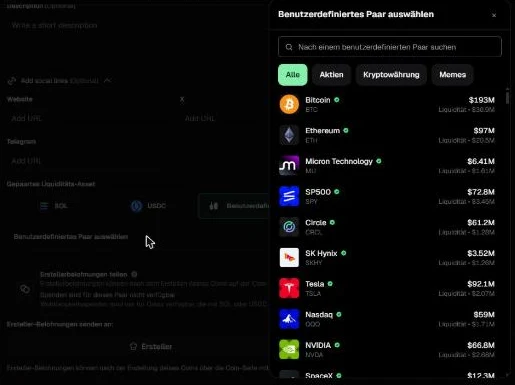
pump.fun create form (German interface) -
Paste the $PEAR CA, create your coin
Paste the $PEAR CA into the search, pick $PEAR, then create your coin. Its branch grows here within a minute.
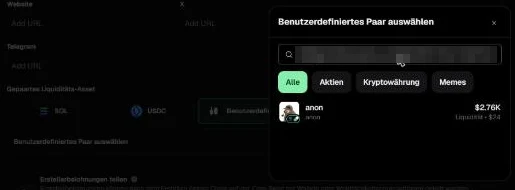
Paste the CA here. The address in the screenshot is blurred; use the $PEAR CA above.
How it works
- Fees$PEAR creator fees come in as SOL.
- Buy $PEARThe SOL buys $PEAR first.
- Buy 0.2% of a branchThat $PEAR buys 0.2% of the next branch’s supply.
- BurnThe tokens are burned on-chain, each with its transaction.
Every buy of a paired coin also buys $PEAR. $PEAR fees buy and burn automatically, one 0.2% step at a time, until every branch has burned 1% of its supply.
All branches
| Coin | CA | Burned | Market cap | Link |
|---|